Console Commands
The RTK Base provides a command-line interface (CLI) for debugging, configuration, and advanced operations.
Hardware Connection
Required Equipment
- USB FTDI/RS232 cable
- Connection to DBG_UART port (5-pin header near Ethernet connector)
Connection Diagram
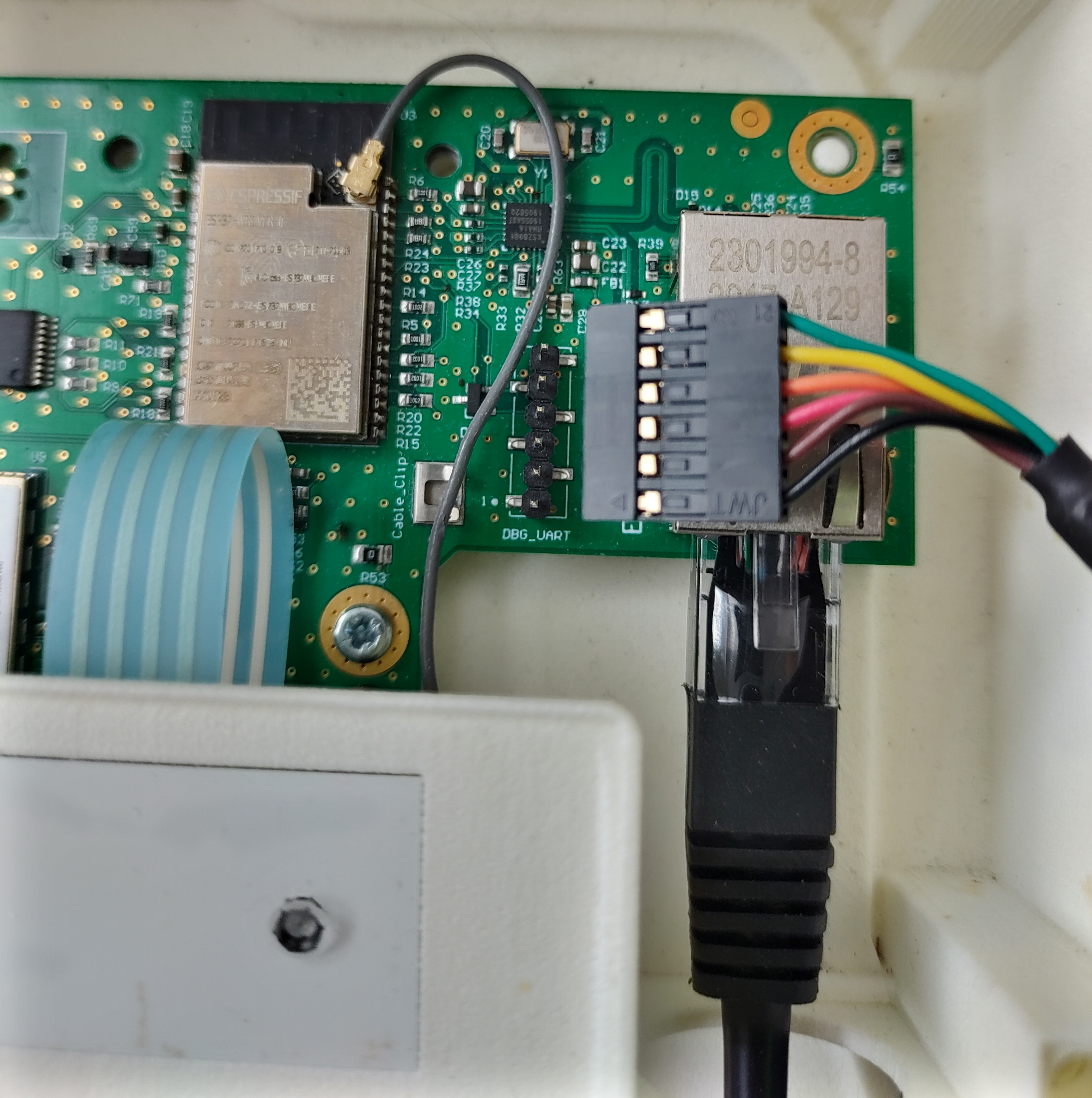
Pin Orientation: - Align the triangle marker with pin 1 (marked on the board) - Pin 1 is closest to the board edge
Software Settings
Configure your terminal software with these parameters:
| Parameter | Value |
|---|---|
| Baudrate | 115200 bps |
| Data bits | 8 |
| Stop bits | 1 |
| Parity | None |
| Flow control | None |
Recommended Terminal Programs:
- Linux:
minicom,miniterm,picocom - Windows:
PuTTY,Tera Term - macOS:
screen,minicom
Command Reference
Type help in the console to see the full command list.
System Commands
help
Print the list of registered commands.
reboot
Reboot the RTK Base.
factory_reset
Perform factory reset (clears all saved configurations).
erase_nvs
Clean all saved configs from Non-Volatile Storage.
Debug Commands
log_level
Change log level of components.
Parameters:
<components>: Component name ("*" for all)<level>: Log level (0-5)- 0: ESP_LOG_NONE
- 1: ESP_LOG_ERROR
- 2: ESP_LOG_WARN
- 3: ESP_LOG_INFO
- 4: ESP_LOG_DEBUG
- 5: ESP_LOG_VERBOSE
Example:
dbg
Debug commands.
dbg task                    # Show task information
dbg task prio ID PRIO       # Set task priority
dbg heap                    # Show heap status
dbg nb-conn [VAL]           # Get/set connection count
dbg nb-restart [VAL]        # Get/set restart count
dbg nb-ant [VAL]            # Get/set antenna failure count
dbg nb-reboot [VAL]         # Get/set reboot count
WiFi Commands
wifi
WiFi configuration and status.
wifi                        # Show WiFi config and status
wifi help                   # Show help message
wifi wap set SSID [PSWD]    # Set AP SSID and password
wifi sta set SSID [PSWD]    # Set STA SSID and password
wifi sta off                # Disable STA mode
wifi sta try                # Try reconnecting STA
wifi sta dhcp start         # Start DHCP client
wifi sta dhcp stop          # Stop DHCP client
wifi sta dhcp restart       # Restart DHCP client
wifi set (on|off)           # Enable/disable WiFi
wifi scan                   # Scan for networks
Network Commands
route
Select interface for default gateway.
route                       # Print current gateway
route e(*)                  # Use Ethernet (persistent)
route s(*)                  # Use STA (persistent)
route a(*)                  # Use AP (persistent)
route (n|-)                 # Revert to software default
route u                     # Re-evaluate gateway
netif
Network interface configuration.
netif                       # Print useful network config
netif dns <IP> [<IDX>]      # Set DNS server (index 0 or IDX)
netif <IFACE> ip <IP>       # Set IP on interface
netif <IFACE> gw <IP>       # Set gateway on interface
netif <IFACE> dns <IP> [<IDX>]  # Set DNS for interface
netif <IFACE>               # Print interface index
netif <IDX>                 # Print interface name
ZED GNSS Commands
get_zed_versions
Get ZED module firmware/hardware/software versions.
set_survey_param
Set survey-in time and accuracy parameters.
Parameters:
- <time>: Minimal survey-in time (seconds)
- <accuracy>: Minimal survey-in accuracy (centimeters)
- <timeout>: Maximal time allowed for survey-in (seconds)
Example:
get_survey_param
Get current survey-in parameters.
zed_set_rate_params
Set CFG-RATE parameters.
zed_set_rate_params [<measurement_period>] [<default_cycle>] [<startup_cycle>] [<svin_cycle>] [<operational_cycle>]
Parameters:
- <measurement_period>: Measurement period (ms)
- <default_cycle>: Zed nav default cycle
- <startup_cycle>: Zed nav startup cycle
- <svin_cycle>: Zed nav SVIN cycle
- <operational_cycle>: Zed nav operational cycle
zed_get_rate_param
Get CFG-RATE parameters.
zed_poll_register
Send poll register request.
Parameters:
- <class>: Register class
- <id>: Register ID
zed_get_status_reg
Get ZED status register.
zed_get_svin_reg
Get ZED SVIN register.
zed_get_sat_reg
Get ZED satellite register.
zed_get_tmode3_reg
Get ZED CFG-TMODE3 register.
zed_get_cfg_usb
Get ZED serial number.
zed_reset
Reset ZED module.
zed_start_survey
Start survey-in (also resets ZED).
Memory Commands
get_addr_snapshot
Show memory snapshot.
Parameters:
- <init_ptr>: Starting address
- <nb_bytes>: Number of bytes to display
memwrite
Write value to memory.
Parameters:
- <init_ptr>: Starting address
- <nb_bytes>: Number of bytes
- <value>: Byte value to write
set_watchpoint
Set memory watchpoint.
Parameters:
- <watchpt_no>: Watchpoint index (0 or 1)
- <init_ptr>: Starting address
- <nb_bytes>: Number of bytes to watch
set_watchpoint_all_cores
Set watchpoint on all CPU cores.
Application Commands
app
Application debug commands.
app ubx trace [0|1]         # Enable/disable UBX tracing
app ubx hex [0|1]           # Enable/disable UBX hex output
app uart dump [0|1]         # Enable/disable UART dumping
MQTT Commands
mqtt
MQTT configuration and control.
mqtt                        # Print MQTT config and status
mqtt host <HOST>            # Set remote host
mqtt port <PORT>            # Set remote port
mqtt renew                  # Remove certificates and reconnect
mqtt start                  # Start MQTT client
mqtt stop                   # Stop MQTT client
mqtt restart                # Restart MQTT client
Serial Number Commands
get_serial_number
Display current serial number from protected NVS.
set_serial_number
Set serial number in NVS.
Hardware ID Commands
get_hardware_id
Get the hardware ID.
set_hardware_id
Set hardware ID in NVS.
Note: If no ID is provided, clears the hardware ID from NVS.
RTCM Commands
enable_rtcm_sign
Enable/disable signed RTCM data.
Parameters:
- <sign_rtcm>: 0 = unsigned, 1 = signed
Transfer Mode Commands
set_transfer_mode
Set the data transfer mode.
Modes: - 1: All disabled - 2: MQTT enabled - 3: UDP enabled - 4: All enabled
Network Interface Commands
net_interface_enable
Enable/disable network interface.
Parameters:
- <interface>: 0 = Ethernet, 1 = WiFi AP
- <enable>: 0 = disable, 1 = enable
Firmware Update Commands
dl_and_update_firmware
Download and install firmware from URL.
Production Commands
start_hardware_test
Restart in hardware test mode.
start_production_test
Restart in production test mode.
Usage Examples
Basic Diagnostics
# Check system status
help

# View WiFi status
wifi

# Check ZED versions
get_zed_versions

# View network configuration
netif
Configuration
# Set WiFi AP
wifi wap set MyBase mypassword123

# Set WiFi STA
wifi sta set MyNetwork networkpass

# Configure MQTT
mqtt host mqtt.example.com
mqtt port 8883
mqtt restart

# Set survey parameters
set_survey_param 90 100 540
Debugging
# Enable verbose logging
log_level * 5

# View heap status
dbg heap

# Enable UBX tracing
app ubx trace 1

# View task information
dbg task
Tips
- Auto-complete: Press Tab for command auto-completion
- History: Use Up/Down arrows to recall previous commands
- Help: Most commands support
helpsubcommand for detailed info - Persistence: Configuration changes are saved to NVS automatically